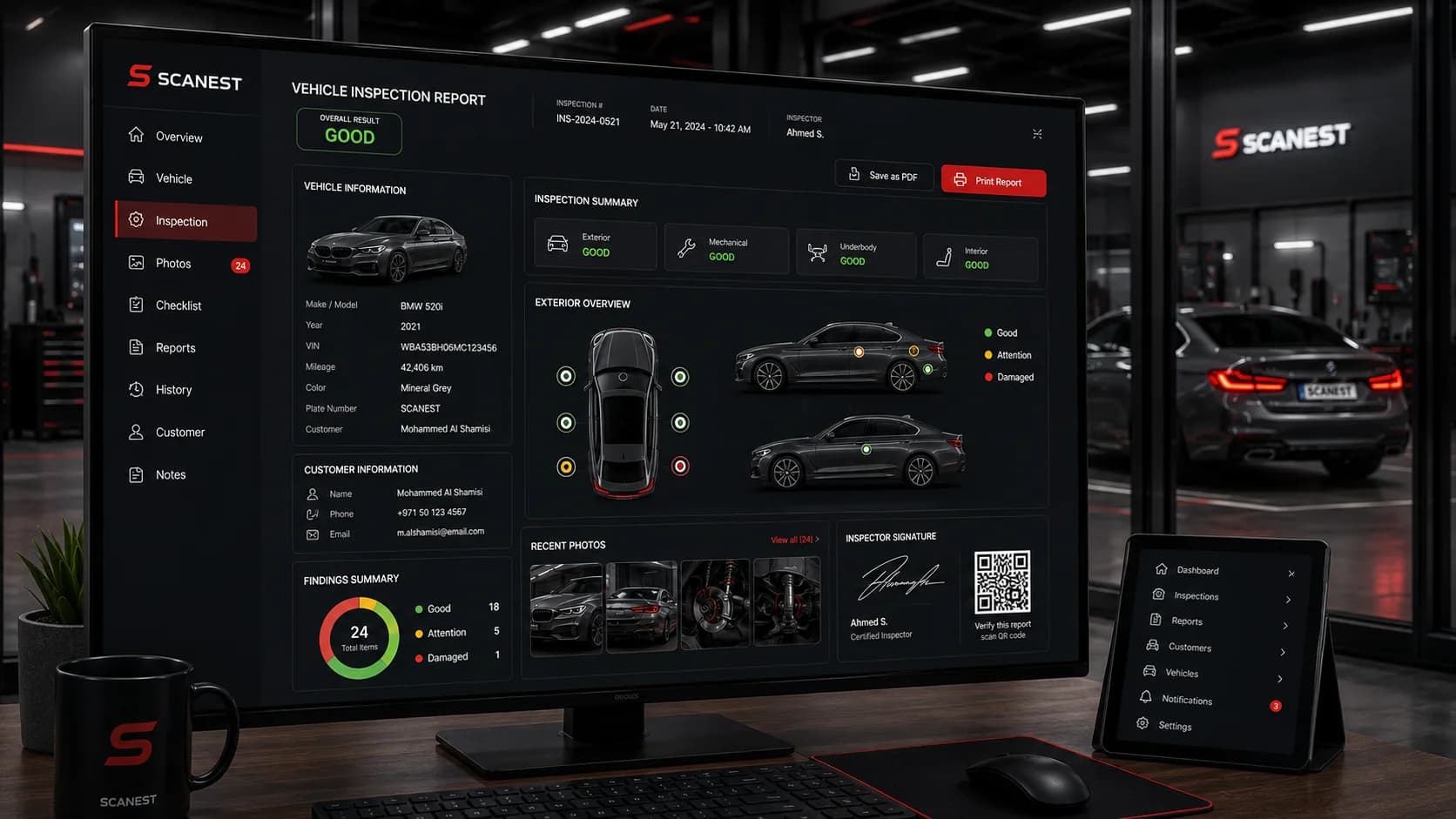
A modern inspection center needs more than a checklist. The Scanest vehicle management system connects vehicle intake, guided inspections, photographic evidence, branded reports and customer delivery in one workflow—so every inspection finishes as a clear, verifiable record your team and customers can trust.
This guide covers Scanest features and benefits, multi-language support across 30+ languages, sample report formats, and how operational dashboards help managers, inspectors and administrators stay aligned.
What is the Scanest vehicle management system?
Scanest is inspection management software built for professional vehicle inspection centers, dealerships, fleet workshops and multi-branch operators. It replaces fragmented paper forms, spreadsheets and ad-hoc messaging with a single system for vehicles, customers, findings and delivery.
Dashboard previews
Scanest presents role-appropriate dashboards for daily operations—without forcing every user into the same screen. The tiles below are compact interface previews: each square shows a different dashboard design with a sidebar and working area, the way teams experience the product in practice.
Core features
Inspection report generation
When an inspection is complete, Scanest generates a structured report with vehicle data, customer details, checklist results, scores, notes and evidence. Reports are designed for customers, buyers, banks and institutional partners—not only for internal filing.
PDF download and print
Every report can be downloaded as a PDF or printed for handover packs, desk copies and archive binders. PDF output preserves branding, layout and verification details so the printed version matches the digital record.
Dedicated report web page
Each completed report receives its own public web page. Customers and partners open a clean, mobile-friendly view of the inspection without needing special software—ideal for sharing a link instead of a large attachment.
QR code verification
Reports include a unique QR code. Scanning it opens the authentic online page, which helps buyers, banks and insurers confirm they are looking at the original Scanest record rather than an altered file.
3D car body with color-coded parts
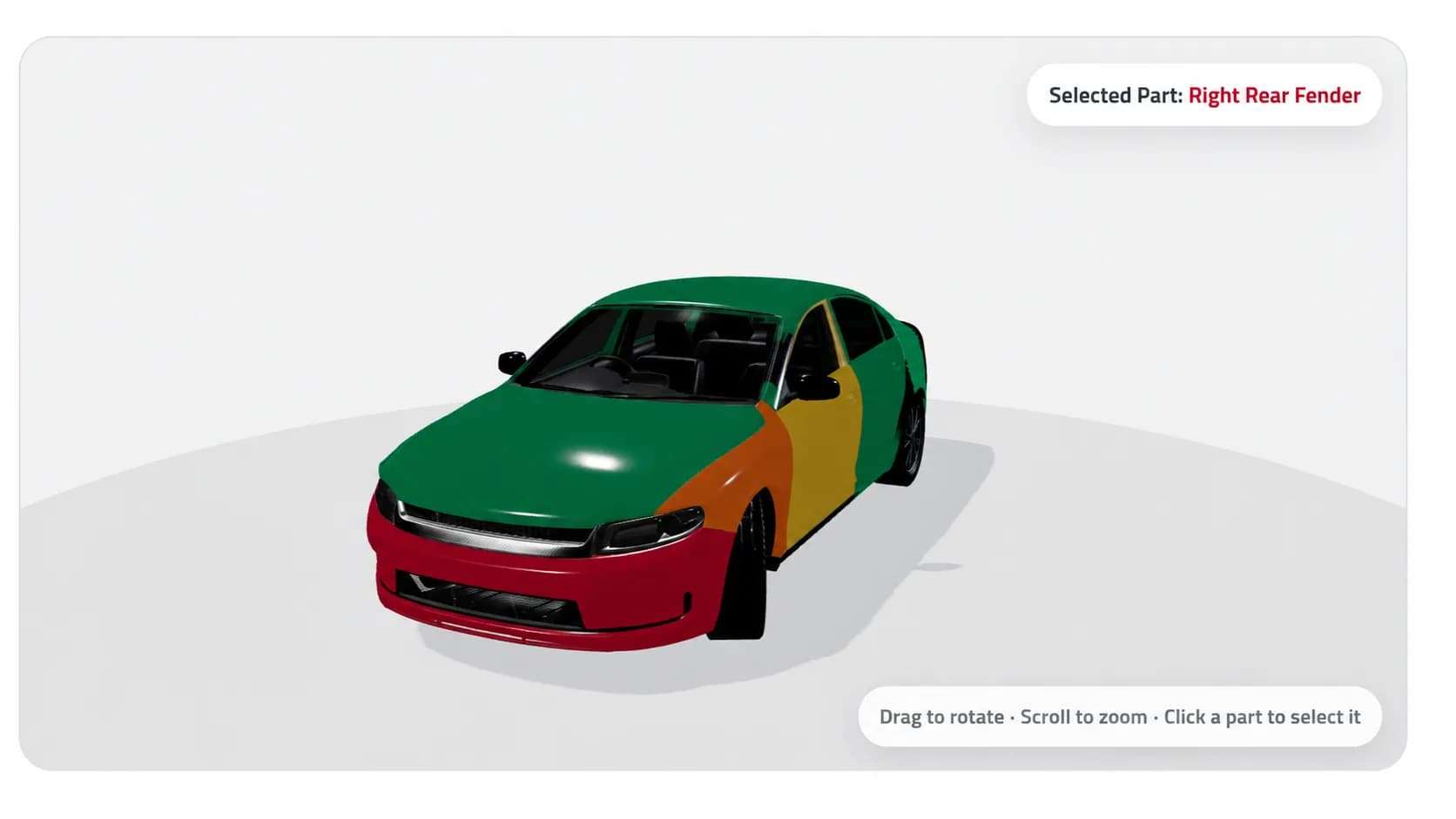
Exterior findings are easier to explain when they are visual. Scanest maps condition onto a 3D vehicle body: each panel can be colored to communicate status at a glance—for example green for good, amber for attention and red for damaged. Customers understand body condition faster than from a text-only list.
Records search
Find any inspection quickly by plate, VIN, vehicle, customer name, phone number or date. Fast search keeps busy reception desks moving and helps managers answer follow-up questions without digging through folders.
Customizable report style
Match your center’s identity: logo, colors, layout, scoring presentation, section order and terminology. White-label templates keep institutional clients and retail customers in a consistent brand experience.
Customizable inspection points
Configure the checklist to your process—mechanical, chassis, body, road test, electrical and more. Add, remove or reorder inspection points so the software reflects how your technicians actually work.
Vehicle images on every record
Attach cover photos and evidence images to the vehicle record and the finished report. Visual proof strengthens customer trust and reduces disputes about what was observed on the day of inspection.
Customer management
Keep customer profiles, contact channels and vehicle history connected. Reception, inspectors and managers share one CRM-style record instead of scattered notes across phones and spreadsheets.
Role-based users
Give inspectors, managers and administrators the access they need—and nothing they do not. Role-based permissions protect sensitive customer data, report approvals and branch settings across multi-user teams.
Auto-send via WhatsApp, SMS or email
When a report is ready, Scanest can automatically deliver it to the customer through WhatsApp, SMS or email. Faster delivery means fewer “is my report ready?” calls and a more professional finish to every visit.
| Capability | What it delivers | Who benefits |
|---|---|---|
| Report generation | Branded, structured inspection outputs | Customers, banks, partners |
| PDF & print | Downloadable and printable copies | Reception & archive |
| Web page + QR | Verifiable online report access | Buyers & institutions |
| 3D body map | Color-coded panel condition | Customers & advisors |
| Search & CRM | Fast lookup of vehicles and people | Front desk & managers |
| Roles & delivery | Controlled access; WhatsApp / SMS / email | Whole center |
30+ languages available
Inspection centers serve multilingual markets. Scanest supports more than thirty languages for the product experience and customer-facing reports, so teams can operate in the language of their staff and customers—including bilingual layouts such as English / Arabic.
- English
- Arabic
- Spanish
- French
- German
- Portuguese
- Italian
- Dutch
- Turkish
- Russian
- Ukrainian
- Polish
- Romanian
- Czech
- Hungarian
- Greek
- Swedish
- Norwegian
- Danish
- Finnish
- Hebrew
- Farsi
- Urdu
- Serbian
- Hindi
- Bengali
- Indonesian
- Malay
- Thai
- Vietnamese
- Chinese (Simplified)
- Chinese (Traditional)
- Japanese
- Korean
- Swahili
Sample reports
Scanest report templates cover premium photo packages, white-label center branding, bilingual technical summaries and Arabic RTL layouts. Explore live samples—including PDF downloads—on the sample reports page.
View all Scanest sample reports
Benefits for inspection centers
- Faster turnaround — intake, inspection and delivery stay in one system.
- Higher customer trust — QR-verified pages and clear visual findings reduce doubt.
- Consistent quality — customizable points keep every inspector on the same standard.
- Stronger branding — every PDF and web report reflects your center’s identity.
- Less admin work — auto-send on WhatsApp, SMS or email cuts manual follow-up.
- Multi-branch control — role-based users and shared records scale with your operation.
- Market reach — 30+ languages help you serve local and international customers.
Who Scanest is for
Scanest fits independent inspection centers, dealership pre-purchase teams, fleet workshops, auction condition lanes and multi-branch networks that need consistent reports, searchable history and professional digital delivery.
Getting started
Book a demo to see how Scanest maps to your inspection points, report style, languages and delivery channels. Most centers start with intake, checklists and report templates, then enable QR pages and automatic customer messaging as the team settles into the workflow.
Book a Scanest demo · Browse sample reports · Explore platform features
Frequently asked questions
Vehicle management system FAQ.
What is the Scanest vehicle management system?
Scanest is vehicle inspection management software for professional centers. It covers vehicle and customer intake, guided checklists, photos, findings, report generation, QR-verified public report pages, and delivery by PDF, print, email, SMS or WhatsApp.
Can Scanest generate PDF reports and print them?
Yes. Every completed inspection can produce a branded PDF that customers, banks and partners can download. The same report can be printed from the browser or the PDF viewer for desk copies and handover packs.
Does each report get its own web page and QR code?
Yes. Each report receives a unique public web page and QR code. Scanning the code opens the authentic online record so buyers and institutions can verify findings without relying on a forwarded file alone.
How does the 3D car body visualization work?
Inspectors mark body panels on an interactive 3D vehicle model. Each panel color represents a condition status—such as good, attention or damaged—so customers can understand exterior findings at a glance.
How many languages does Scanest support?
Scanest supports more than 30 languages for the interface and customer-facing reports, including English, Arabic, Spanish, French, German, Portuguese, Turkish, Russian, Chinese, Hindi and many more. Centers can run bilingual templates where needed.
Can reports be sent automatically to customers?
Yes. When an inspection is completed and approved, Scanest can automatically send the report to the customer by WhatsApp, SMS or email—based on your center’s delivery preferences.